This is a version of the document I used at Question as its Tech Lead.
Permission to use this on my portfolio was granted by my gracious former business partners.
Unfortunately, the quality of the images took a major downgrade during the conversion to sendable files. Apologies in advance for words in Blueprint being hard to read.
Replication Tactics for Designers
A Single Player Game
Check out this badass single player immersive sim!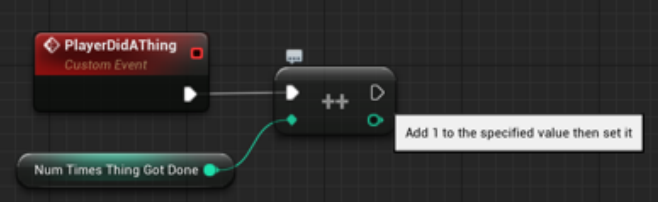
Now Make It Multiplayer
The publisher came by and said that single player games donʼt make their money back.
Multiplayer is where the money is. So… umm… I guess weʼre a multiplayer studio, now.
Question: If 'NumTimesThingGotDone' is 0, what happens in that above single player blueprint in a 4 player game when the PlayerDidAThing event triggers?
Answer:
- If you can guarantee that each version of that player in the multiverse does the thing consistently, then nothing bad happens and every machine in the multiverse will have a value of 1 for 'NumTimesThingGotDone'
- But if lag or filthy hacker causes mismatched positions or any kind of situation in which the conditions of one machineʼs universe do not match the conditions of another machineʼs universe, then ‘NumTimesThingGotDone' will not be the same on each machine on the network because some machines may not have triggered the 'PlayerDidAThingʼ event.
The Multiverse
From this point on, Iʼll refer to the shared simulation across various machines as the multiverse.
Because each machine is actually running its own simulation of the universe which just happens to have a copy of every Actor in its version trying its best to convince you that they are in fact the same Actor.
- The most important concept of the multiverse is that In a 4-player multiplayer game, one version of you (the player) is real (the local player) and the rest are fake representations of you being presented to some other player.
- The second most important concept of this multiverse is that one machine serves as the host, and that host is trusted by default whereas every other machine must do certain things in order to earn the trust of the host machine.
Easiest Solution: Server Logic + Replicated Variable
You can think of this as hiding your single player logic behind an “IsServer” node.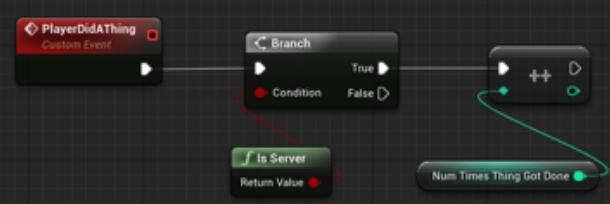
Now 'NumTimesThingGotDone' will be incremented only on the host machine, but NOT on any of the clients. We have to trust at least one machine in the network to make changes, so we choose to trust the host machine, otherwise known as the server.
Question: At this stage, if 'NumTimesThingGotDone' is 0, what happens in that above single player blueprint in a 4 player game when the PlayerDidAThing event triggers?
Answer:
Only the host machine will have ‘NumTimesThingGotDone' = 1. The client machines will still have 'NumTimesThingGotDoneʼ = 0 because IsServer is false on those machines.
You Gotta Replicate It
<cue The Offspring>
Hereʼs how you make a variable replicated: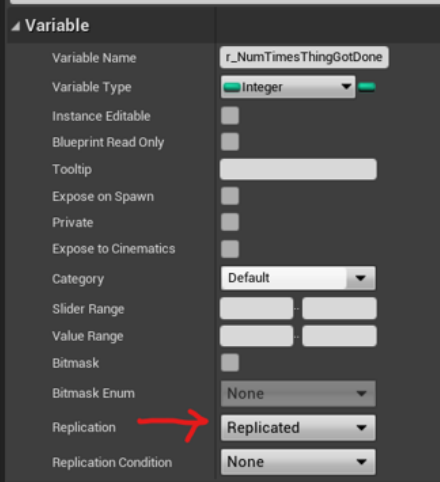
Replication has a network bandwidth cost. We donʼt replicate variables unless we have to.
Notice that we stuck an “r_” prefix in front of the variable name. This is a style suggestion that lets you know that this Blueprint variable is not just any old variable…. itʼs frickin' replicated!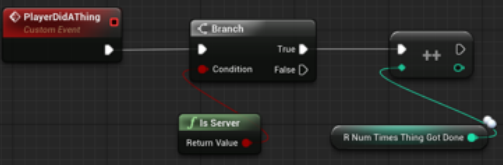
Question: At this stage, if 'NumTimesThingGotDone' is 0, what happens in that above single player blueprint in a 4 player game when the PlayerDidAThing event triggers?
Answer: Exactly what you would hope for. All machines in the multiverse will have ‘NumTimesThingGotDone' = 1
Note that replicated variables should only be changed on the server, or else you get mismatches across different machines, at which point… why would you bother making it replicated?
I want… PARTICLES when the thing gets done
Particles are so in, right now!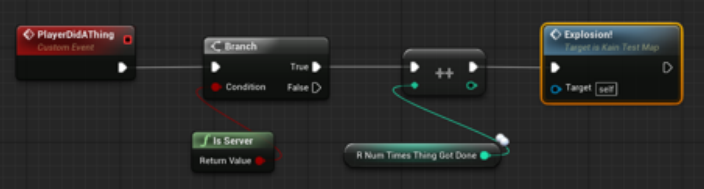
At this stage, you might be able to guess that the particles will only show up on the server machine but not each client.
So the player does a thing, but only the host gets to see the cool Explosion. Booooo!!!!
Replicated Ainʼt Enough… You Need RepNotify
Remember that variable you made replicated?
Make it RepNotify, instead.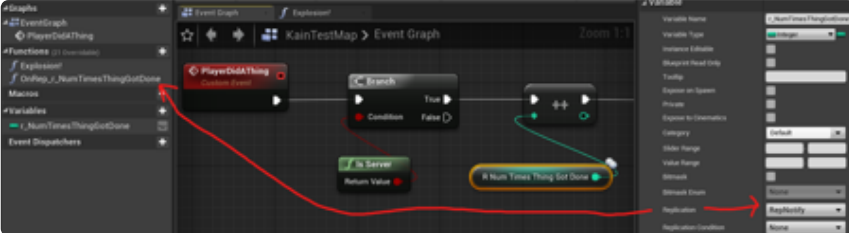
As soon as you made it RepNotify, the Editor automatically added a new function to your Blueprint: OnRep_r_NumTimesThingGotDone
This function will magically be called every time r_NumTimesThingGotDone changes on every machine, including machines that are joining a game in progress in which ‘r_NumTimesThingGotDoneʼ got changed long before that joiner arrived.
So take that explosion off the chain of Server-only logic…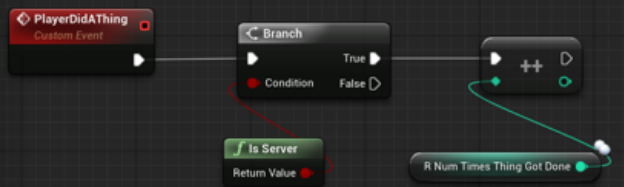
… and make that happen inside the RepNotify, instead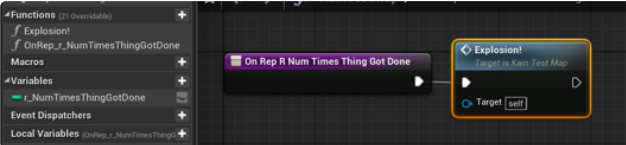
Now every connected player within the network will get to witness that beautiful explosion when the server changes the value of 'r_NumTimesThingGotDone '. This has the problem of new players joining a game in progress seeing an explosion when they first enter the world, but that's okay for this example. We'll talk about using Multicast to fix that problem later in this document.
Special note to any C++ programmers reading this:In C++, you must manually call OnRepNotify on the host machine when the replicated variable changes, but in Blueprint, Unreal automatically calls OnRepNotify on the host machine whenever that replicated variable changes, which is nice.
But I want that explosion to happen without lag
Letʼs say it takes 10 seconds for a network packet to go from one client to the server.
That means the client will see this explosion 10 seconds after the host saw it.
Letʼs also say that the “PlayerDidAThing” event is based on a button press.
Now the button press must travel all the way up to the server, which takes 10 seconds, and then the server does that thing, which causes ‘r_NumTimesThingGotDone' to replicate down to each client, which takes another 10 seconds. Thatʼs a total of 20 seconds from button press to explosion!
So… How about this?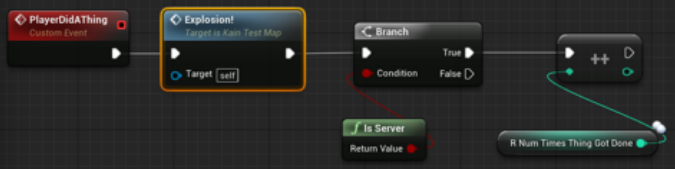
Or this?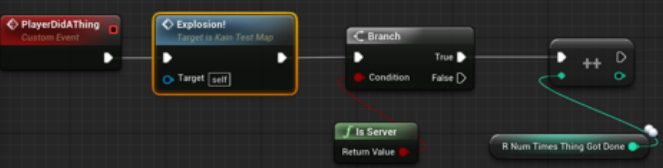
and then take that explosion out of the OnRepNotify. We can set 'r_NumTimesThingGotDone' back to just plain old replicated, if we want.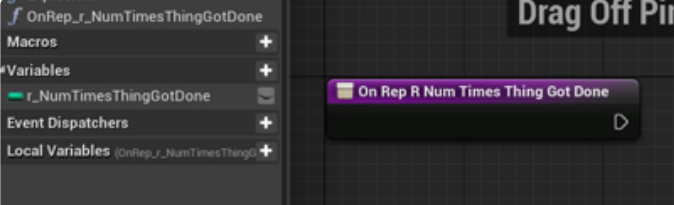
In both of these cases, 'r_NumTimesThingGotDone' will be correct, and the explosion will happen without lag, but remember that bit about mismatch between positions and whatnot across the network?
We call this the desynch problem.
The Desynch Problem
Position is the most common thing that gets desynchronized. Imagine chasing a moving enemy and pressing the attack button to try to hit that enemy. The faster you move and the faster the enemy moves, the more likely it is that the timing from your button press to that 'PlayerDidAThing' event will be inconsistent across the multiverse as those position and input packets travel across the network.
Lag and desynchronization combined with a UI full of affordance information that the local player trusts is the reason why we must trust a local playerʼs client for certain actions. We can police those actions on the server if we really care, and we already do for things like movement. Unreal lets the client move and jump with full trust on the local machine so that movement feels responsive and lag free from the local playerʼs point of view. The server keeps track of that movement from a remote machine and may teleport the client into a “legal position” if the mismatch between client and server positions gets too extreme.
Solution to Desynch: Server functions
We can do the explosion on each machine and then call a server function to change that replicated variable. A Server Function is basically just a Custom Blueprint Event you create and set two very important properties on:
- Replicates - set to “Run on Server“, which tells client machines to send a command to the server to run that event
- Reliable - You really want this checked or else, this function may not get called if the network ever feels stressed… unchecking this can lead to a horrendous hard-to-repro bug where it works most of the time but breaks some of the time and only when the network is stressed
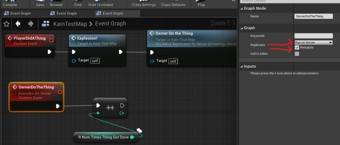
Notice that we named that event with a “Server” prefix. This helps people just looking at the Blueprint know that this just ainʼt any old Custom Event, it is a frickin' Server command that sends packets into the internet!
Question: Assuming 'r_NumTimesThingGotDone' is 0, what happens when PlayerDoesAThing once in a 4-player multiplayer session?
Answer: 'r_NumTimesThingGotDone' will be 4 because each version of that player in the multiverse will have sent that Server command independently of each other.
Not only that, but the placement of Explosion does not address the desynch problem.
Treating the Local Player Differently
This works: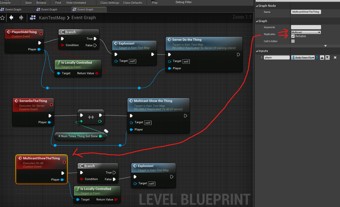
Because…
- We are trusting the locally controlled player when it says it did a thing. This makes sense because the local player probably has local UI telling it that it can do that thing if it presses the button. By trusting only one player within the multiverse, we address the Desynch problem
- We do the explosion only for the local player and not those simulated representations of that player on the other machines in the network. This means lag free explosion for the local player
- We call the Server function only for the local player, which means it only gets called once within the multiverse and not one for each version of that player on each machine
- 'r_NumTimesThingGotDone' only gets changed on the server, which is the only safe way to change this replicated variable
- And then thereʼs that Multicast function that makes sure every machine in the multiverse presents an explosion as long as it was not the local player, which already got to enjoy a lag free explosion at the start of this chain
Multicast vs RepNotify
These almost do the same thing. There is a time and a place for each.
Multicast functions only work when called from the Server. It is very common to have the Server function call a Multicast function.
It basically broadcasts that command from the server to every machine on the network, including itself and the local machine that started this chain of events.
With Multicast…
- You can pass additional parameters, such as “player” - in the example above, we needed “player” to know whether it was local or not. RepNotify has no extra parameters, and so you must use whatever variables you have access from within the Blueprint
- Reliable Multicasts always happen when you call them where RepNotifies only happen when the variable changes. For example, adding 0 to a replicated integer will not trigger the RepNotify because Unreal tries not to send network packets when it doesnʼt have to.
- Multicast is Fire-and-forget. If a player joins a game in progress, they will not see that explosion that happened 10 minutes ago. In contrast, if we had stuck with the RepNotify method of presenting explosions above, then a player joining a game in progress will see a fresh explosion when they first join the game even though it may have happened 10 minutes ago.
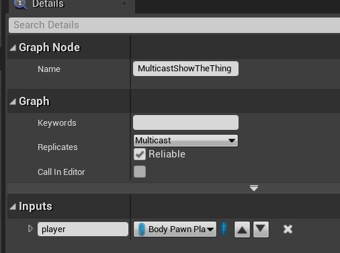
As with the Server event, the “Reliable” checkbox is really important here… unless you are fine with losing the presentation of explosions when the network is stressed, which may actually be okay in this case. I mean… do people even look at explosions, these days?
Notice that in this example, I named that event with a “Multicast” prefix. This is because we want anyone looking at the Blueprint to know that this isnʼt just any old custom event, it is a frickin' Multicast event that is sent from the server to all machines within the multiverse!
The Late Joiner problem
Letʼs say you have UI that needs to know something about other players.
If you multicast that from the server and have UI listen to that event, then all players in the game will have correct UI.
BUT… if a player joins a game in progress, they will have missed the multicast. This is good for explosions, but bad for maintaining a consistent value for r_r_numTimesThingsGotDone across the multiverse.
If you need late joiners to have the correct information about past events, then use RepNotify instead of Multicast and have your event come from the RepNotify function. That event will get broadcast for the late joiner as soon as the variable changes on their local machine.
This Blueprint will only work properly on the host
This Blueprint is a Level Blueprint.
If it were inside a PlayerBodyʼs Blueprint, then there actually wouldnʼt be a problem.
But if the Blueprint were inside just some Actor in the world that is not a Player, like a lamp post, then there would still be a problem.
Why? Because of this part: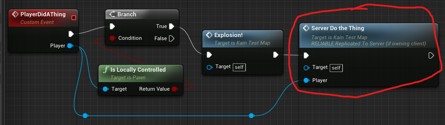
When a client machine makes a Server call from a level Blueprint, the host machine says “prove you are not a filthy hacker!”, and without proof, it silently ignores the command for “ServerDoTheThing”. Well.. not completely silent; it tells you in the log file, but who reads log files, these days, amirite?
The host is the only machine that gets full trust on Server commands as if it were a single player game. Clients running code and Blueprint can only make Server commands if the command came from an Actor owned by the local Player… because of Unrealʼs concept of Actor ownership as its means of verifying trust.
Actor Ownership
The way a client proves it is not a filthy hacker is by being granted ownership of the Actor that the Server call belongs to.
Players own their bodies and all other objects that are strongly associated with them:
- Pawn
- Controller
- PlayerState
- Any component on those actors owned by the player
For any actors that fall within these categories, your server calls will work as youʼd expect, and
you wonʼt need to employ any tricks like the “Player Conduit” technique in the next section.
For everything else, we must do what we shall lovingly refer to as…
The “Player Conduit” Technique
NOTE: Everything in this section should be done on a component attached to the player instead of inside the player actor's blueprint... it's getting crowded in there, and we don't want too many people having reasons to check out that binary file at the same time.
First, we make a Server function inside the Playerʼs Blueprint…
And then we call that instead of the Level Blueprintʼs function which is considered “unowned” because no one player owns the level.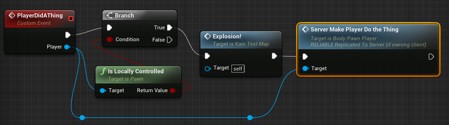
And then from there, you can do anything you want from the Playerʼs Server function because it is being executed on the host machine and the host machine has 100% trust as if it were a single player game.
As with other names in this document, using the 'Server' prefix on a name gives an outside observer useful information about the network properties of that function if they see it in a log file or call stack.
Other possible names for “ServerMakePlayerDoTheThing” include:
- ServerUseThePlayersBodyLikeANetworkTunnel
- ServerDoTheThingEvenThoughThePlayerMightNotReallyBeInvolvedHere
- ServerDoTheThingAndThePlayerHasNoIdeaItWasUsedAsAConduit
- ServerGotInvitedToThisPartyBecauseIHidInsideThePlayersCoat
- ServerThePlayerIsMyPasswordVerifyMe
- ServerHeyPlayerCanIBorrowYourBodyForASec
We donʼt want the PlayerBodyʼs Blueprint to get too crowded with stuff, and so the rule of thumb here is to use this technique only when you need some player action to affect the world and you donʼt have a nice way of doing that logic 100% on the server.
Good candidates for this “player conduit“ technique:
- Grappling an enemy - because you are moving and the enemy is moving
- Opening a chest - because your UI should never be called a liar
Bad candidates for this technique - Do it 100% on the server, instead:
- Entering a volume to end the mission - because players canʼt see volumes, so we donʼt care about positional inaccuracy as long as it is close enough
- Final mission objective officially acknowledged, move on to the next mission - because a few seconds of lag wonʼt really matter to most people for this type of information
Use your judgement on how you funnel commands through the Playerʼs body to affect the hostʼs world in ways that properly replicate via RepNotify and Multicasts.
The “Player Conduit” Technique Works with Components
If you are worried about dirtying up PlayerBody with a bunch of stuff that is unrelated to the Player, then good! You should be. We want to avoid kitchen sink files in the project that everybody has to check out at the same time.
There is a better way than sticking this stuff inside the player. Stick that stuff in your own BP class derived from ActorComponent and then stick that ActorComponent on BodyPawnPlayer.
Programmers can make classes NOT require the Player Conduit Technique
If the class was made by a programmer, there are things they can do in code to ensure that your RPCs will work without the need for this technique.
Note to Programmers: You accomplish this by doing the following:
- Overwrite these functions…
virtual int32 GetFunctionCallspace(UFunction* Function, FFrame* Stack) override;
virtual bool CallRemoteFunction(UFunction* Function, void* Parameters, FOutParmRec* OutParms, FFrame* Stack) override; - Make sure the UObjectʼs Outer/Owner can be traced back to a chain of owners that leads back to the PlayerController
Frobbing
<this section omitted to avoid boring the reader of this public version with implementation details about our interaction system>
Testing Your Blueprint In Multiplayer
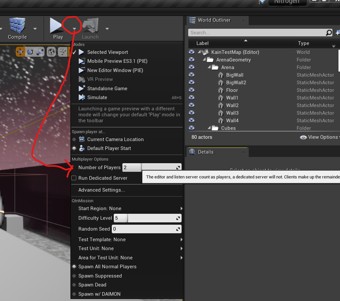
Hereʼs how you do it: